Frontline OA%
Overview
Frontline OA% stands for Opportunity Alignment %. It measures the effectiveness of frontline leadership in aligning coaching sessions with identified performance gaps. In a contact center environment, KPIs have defined thresholds—whenever a performer falls below a threshold (e.g., for a sustained week), a coaching "opportunity" is automatically identified.
Frontline OA% provides a macro view of this coaching pipeline by calculating how many of these identified opportunities are actually being coached by a Team Leader versus how many are being uncoached or missed. It ensures that coaching is being prioritized for the right metrics and the right people to drive overall performance improvement.
Frontline OA% Summary Bar
The top of the module provides a high-level executive summary of the organization's coaching health.
| Metric | Description |
|---|---|
| Total Opportunities | The total number of identified performance gaps across the selected population. |
| Front Line OA (Opportunity Alignment) | The percentage of identified opportunities that have been formally aligned with coaching sessions, versus those left unaddressed. |
| Expected Opps. | The number of coaching opportunities expected based on performance thresholds. |
| Funded Coached Opps. | The count of opportunities that where founded as Coaching Time and have been coached. |
| Total Agents | The total headcount of agents or performers for a given campaign. |
| % of Agents with Opps. | The percentage of the total agent population currently identified as having a performance opportunity. |
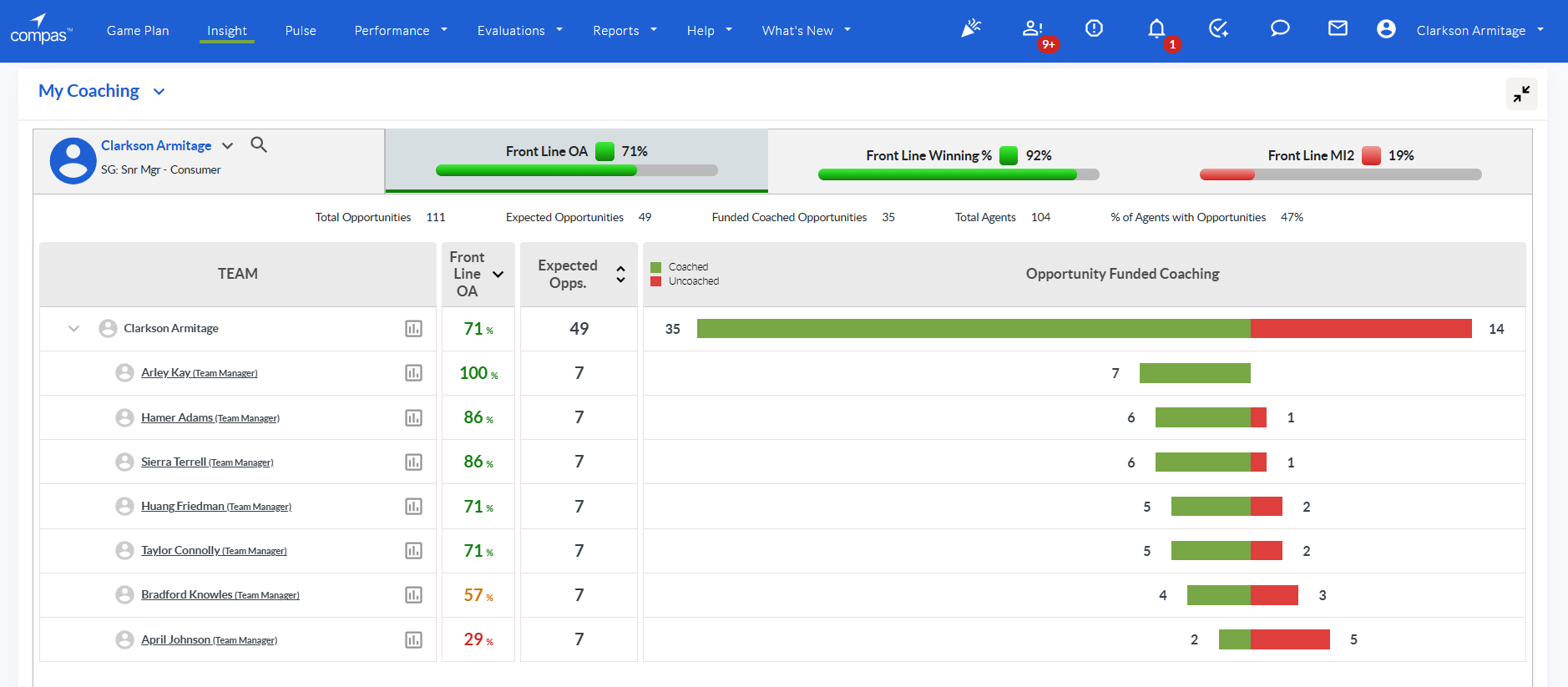
Fig 1. Frontline OA% home
The Frontline OA% Grid
The main interface allows leaders to drill down from the organizational level to individual teams to see where coaching is being funded and where it is stalled.
Column: Team
This provides a hierarchical view of the organization.
- Expansion: Clicking the chevron icon expands the manager's view to show direct reports (Team Managers or Agents).
- Metric Focus Icon: Located next to the name, clicking this icon opens a detailed breakdown of opportunities by specific KPI.
Column: Front Line OA
This column measures the conversion of performance data into identified opportunities.
- Current Actual: The percentage of OA achieved.
- Color Threshold: Indicates if the OA percentage is favourable (Green), close (Yellow), or unfavourable (Red) to the organizational target.
Column: Expected Opps.
A numeric value representing the volume of coaching opportunities that should be occurring based on the performance data of the frontline agents.
Column: Opportunity Funded Coaching
A visual distribution bar representing the status of identified opportunities.
- Green Bar (Coached): This bar grows to the left and represents the Opportunities that have an active, funded commitment plan in Compas.
- Red Bar (Uncoached): This bar grows to the left and represents the Expected opportunities that have not yet been addressed through a formal coaching commitment.
- Functionality: Hovering over the bar provides a tool tip showing the exact count of Coached vs. Uncoached opportunities.
Metric Focus Detail
Clicking the Metric Focus icon within a team row expands a sub-grid that breaks down the performance by individual KPI (e.g., Contact Quality, AHT, Conversion %).
- Metric Focus: Lists the specific KPIs being tracked.
- Total Opportunities: The count of opportunities identified for that specific metric.
- Opportunities Bar: A horizontal bar chart showing the ratio of Coached (Green) to Uncoached (Red) for that specific metric, allowing a manager to see which KPIs are being neglected in coaching sessions.
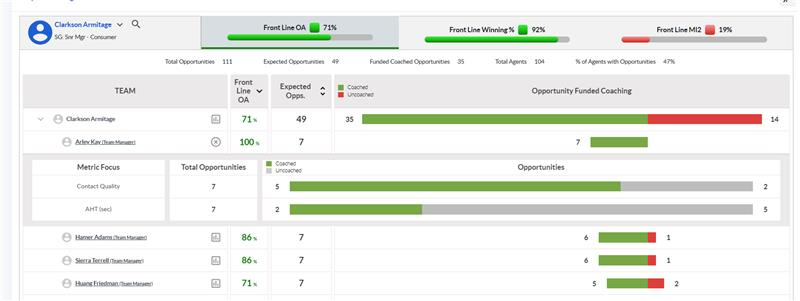
Fig 2. Metric Focus Detail
Search and User Selection
The Search for User (magnifying glass) utility allows for precise filtering of the data displayed in the widget.
- Individual Selected: Displays the current primary performer being viewed.
- Favorites: A quick-access list of frequently monitored managers or teams (indicated by a star icon).
- Status Filters: Ability to toggle between Active Users, Deactive Users, or All Users.
- Direct Reports Grid: A selectable list of performers under the selected manager, including their role (e.g., Team Manager).
Configuration & Permissions
Frontline OA% follows the same logic as the standard Winning % module regarding data calculation and access:
- Winning Threshold: The % improvement required for a commitment to move from "Improving" to "Winning."
- OA Targets: Configurable targets that determine the color-coding (Green/Yellow/Red) of the Front Line OA column.
- Access: Permissions are derived from the overall Coaching Insight Module. If a user can view a performer’s coaching data, they can view their Frontline OA% metrics.